

Training Data
Create a New Table in the Data Layer:
– Lessons from a 3-Month Intern on Ticket Writing
When you join Vatico as an intern, writing a ticket is not a routine for a task—it is to figure out the problem, see if there is any solution, and determine if that solution makes sense (sometimes it is okay to not have a solution yet, like the data problems with GA4).
The 10-80-10 Rule: Problem Scoping in the Age of AI
Our problem-solving draws inspiration from a famous benchmark in Steve Jobs’ management style: spend 10% communicating the vision, let others own 80% of the execution, and spend the final 10% polishing and refining.
At Vatico, the 80% execution is moving to AI now. This means our core human value lies in that first 10% (defining what is to be done) and the last 10% (final refinement and validation). Building on this point, because AI handles the execution, the scoping of tickets is now skewed towards a workflow of: 60%–70% of our time spent scoping and refining requirements; 20% asking AI to generate the code (relying on your perfect ticket to hit the mark in 1–2 iterations); and 10% running database validation checks before production PRs.
My Five Core Principles of Scoping From Experience
To win at that first 10%—defining the vision so cleanly that Vatico Bot can build it without hallucinating—you need a rigorous filter. Before I draft a single line in our ticketing system, I personally run my initial thoughts through five strict principles. Revisions happen because of assumed facts being taken as truth without verification. To write a bulletproof ticket, adopt these rules:
Note: This is a good guideline but it does not cover all core principles. You may refer to
your onboarding slides for deeper understanding in those.
❌ The Mindless Way
Taking stakeholder claims at face value, executing briefs blindly without questioning missing details, and drafting massive, multi-day master tickets without concrete inputs.
The Result: Multiple revisions, code logic built on wrong assumptions, and bloated
tasks that stall.
vs
✓ The Vatico Way
Applying always validate, questioning the brief for gaps early, keeping steps no-brainer, and ensuring extreme specificity with exhaustive column and file mappings in your deliverables and action items.
The Result: Faster approvals and clear requirements that Vatico Bot can read
without hallucinating.
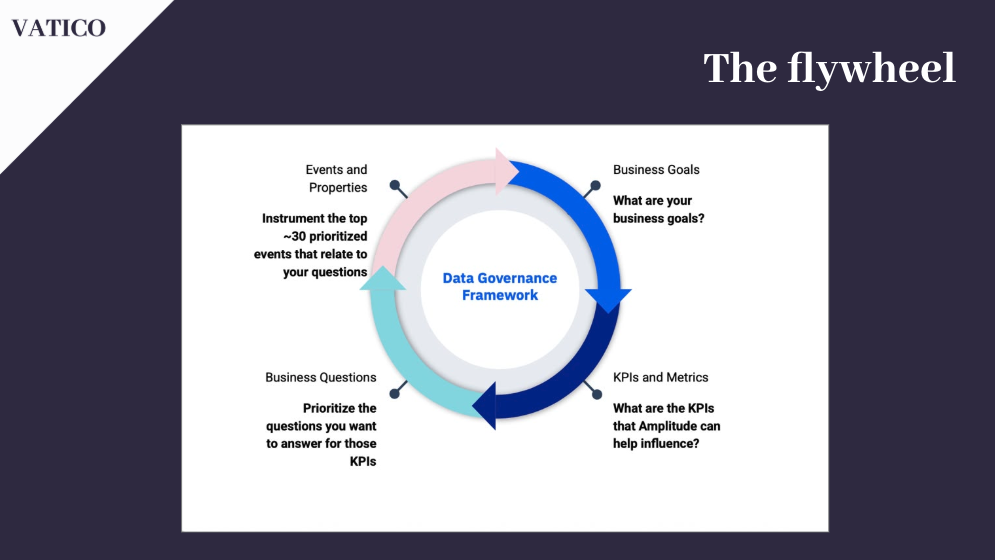
1. Follow the Flywheel (Data Governance Framework)
A core scoping principle at Vatico is to always follow the Flywheel. Data operations are not isolated technical tasks—they are a continuous cycle that maps database properties directly back to business outcomes. Before defining schemas or writing ingestion scripts, trace your ticket through the four stages of the data governance cycle:
2. “Facts Only” & Always Validate
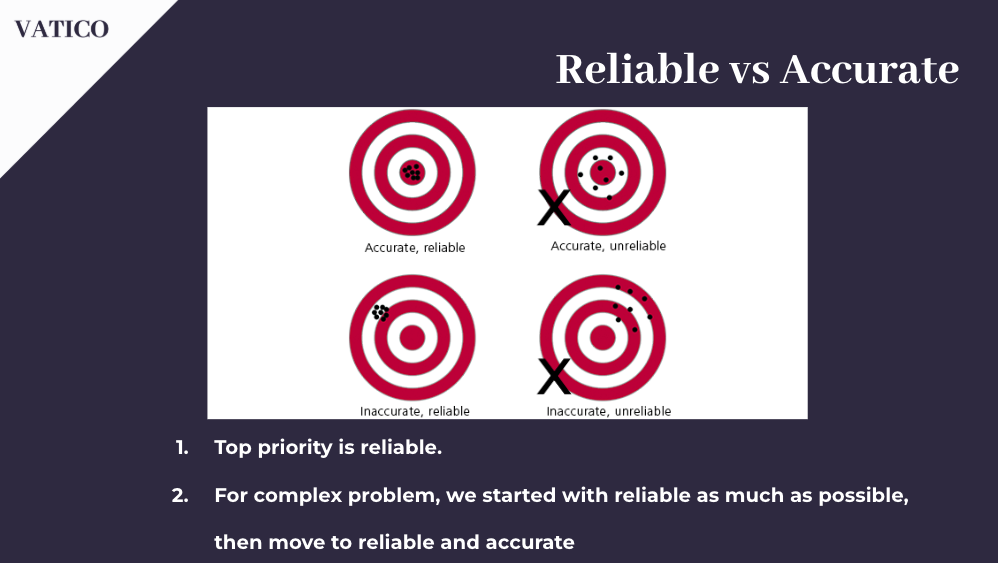
Giving facts ensures reliable work. Always validate your facts for all work by checking the actual sources of truth (like pgAdmin or raw logs) and never accepting claims at face value, even from a senior team member. If you are unsure, remember that vague > wrong—exclude unverified claims until you confirm them. Why it matters: Validation keeps our work as close to the truth as possible. Most ticket revisions happen because unverified assumptions are treated as facts, which silently breaks downstream analytics. Excluding unverified info is the only way to ensure accuracy.
3. Question the Task
Never execute a request blindly. Stakeholders and supervisors make mistakes or leave out critical gaps, leading to incomplete briefs. Why? If you don’t catch omissions early, you will waste twice as much time rewriting models and queries later when errors are found. Before committing, ask yourself: “If they want AWS costs, do I need currency columns to map USD vs SGD?” Clearing these gaps up front ensures you get the task done right in a single attempt.
4. Intentionality — Less is More
Being intentional in work is effective. Complex and big work is a NO-GO at Vatico; if it’s big, then we break it down into a no-brainer. All pieces of work must earn their place: cut the unnecessary, as work must be seen at a single glance—small scope equals more clarity and effectiveness. Finally, work must be explainable to a child; if it cannot be, your explanation is not effective.
5. Every Step Must Be a No-Brainer (Divide & Conquer)
Any ticket that requires more than 1 hour of active execution signals a process failure. Why? ALL tasks should be a no-brainer. If a task requires more than 1 hour, there is something fundamentally wrong with the process or scope. By keeping steps no-brainer and single-focused, we eliminate confusion and reduce cognitive load. If you run into a large, complex problem, remember to divide and conquer: break it into smaller sub-tickets, focus on the base step first (like raw ODS ingestion), then work your way up.

Case Study: AWS Cost Staging Ticket – Crafting the Perfect Background
Every ticket’s background must outline a clear contrast between what exists today and what needs to happen. We split this into a strict framework of Reality and Expectation. This helps the human reviewers understand whether the tasks makes sense or not.
How to Structure the “Reality” (Facts Only)
The Reality must state exactly what is happening in production today, avoiding opinions and assumptions. Covered directly from our AWS Cost case study:
1. What is the current problem? Within PostgreSQL, the raw AWS Billing data
currently lands in bb_sg.staging.ods_file_aws_cost_src_billing_mi. However, there is
currently no transformed staging table in Postgres for this data, meaning the business has no
structured way to confidently gather insights from AWS Billing data.
2. What is the business objective? Vatico now operates across three distinct streams — retail, new products (e.g. MCP), and services (e.g. forward deployed engineer). Because of these diversified streams of revenue, the business goal now is to track ROI and cash flow at the level of each cost stream, so that leadership can judge whether the resources being provisioned for a given stream are worth the funds drawn from revenue.
3. What is the business implication if unsolved? AWS is one of the company’s core infrastructure costs. If this remains unsolved, the business will continue losing money to infrastructure costs that provide a low Return on Investment (ROI) because leadership has no data-driven visibility to identify and cut them.
How to Structure the “Expectation” (End State, Not Code)
The Expectation describes the desired final state of the system—not the technical solution you will implement. Focus on the end goal, because your query methodology might change during development.
The Cockroach Rule: If there is a cockroach in the room, your expectation is simply: “The cockroach is dead.” You should not write, “I will use a slipper, bug spray, or a rolled-up newspaper to strike the cockroach.”
Why? Because the methodology or methods used can be changed throughout the ticket. If you waste time listing technical steps and then change your mind during implementation, your ticket becomes obsolete and requires rewriting. Focus on the end goal (dead cockroach) so your ticket remains valid no matter how you technically solve it.
Example Expectation (from AWS Billing Ticket): “Transform the AWS Billing data from
bb_sg.staging.ods_file_aws_cost_src_billing_mi into a PostgreSQL dbt staging model,
making this data available for downstream reporting of costs.”
Key Rules for the Background Section (Ordered by Importance):
• The Title & One-Sentence Goal: If your title is clear and concise, 90% of the ticket will write itself. State the goal in one sentence. Why? If you cannot explain the goal of the ticket in one sentence, you usually do not know what the goal is. Summing it up forces you to find the exact core of the task.
• Input & Output in Simple English: Where does your data come from, and where should it go? Explain it so a child can understand. Why? To strip away the technical noise. Understanding the high-level input and output clarifies the direct flow of the data and makes it readable for stakeholders who aren’t technical developers.
AWS Cost Staging Ticket : Deliverable and Action Item
Mock Input Data Rows (Truncated Example)
A good ticket lists mock inputs to define structure. Note: It is critical that you show the full table in a real ticket. The example below is shown with ellipses (…) only to illustrate the formatting for illustration.
| Column | Row 1 | Row 2 | … | Row 3 |
|---|---|---|---|---|
| billing_period (start_date and end_date) | 2026-06-01 00:00:00+00 | 2026-06-01 00:00:00+00 | … | 2026-05-01 00:00:00+00 |
| dimension_key | SERVICE | REGION | … | USAGE_TYPE |
| dimension_values_array | [“Amazon EC2″,”Amazon S3”] | [“us-east-1″,”eu-west-1”] | … | [“DataTransfer-Out-Bytes”] |
| … | … | … | … | … |
| credit_type | PROMOTIONAL | ENTERPRISE_DISCOUNT_PROGRAM | … | SERVICE_CREDIT |
| cost_amount | 1542.37 | 87.12 | … | 214.89 |
| currency_code | USD | USD | … | USD |
| loaded_at | 2026-07-02 03:15:42+00 | 2026-07-02 03:15:42+00 | … | 2026-07-02 03:15:42+00 |
Exhaustive Deliverable Specifications (Verbatim Mapping)
To avoid misinformation for ODS tables and STG (staging) tables only, we map columns exactly to the documentation and state the exact business context. Note: It is critical that you show the full mapping table in a real ticket. The example below is shown with ellipses (…) only to illustrate the formatting for illustration.
| Column | Description (verbatim from YML) | Why it matters for ROI |
|---|---|---|
| billing_period (start_date and end_date) | A specific billing period identified by year and month, in timestamp with time zone format. | Lets you match AWS cost to the right month for comparing against revenue. |
| dimension_key | The names of the metadata types that you can use to filter and group your results, in text format. | Tells you what (service, region, usage type) |
| dimension_values_array | The metadata values that you can use to filter and group your results, in text format. | Tells you exactly what’s driving the cost. |
| … | … | … |
| credit_type | The type of credit. E.g. Promotion, Refund, TrueUp, in text format. | Tells you if discounts are applied to this cost. |
| cost_amount | The amount as a decimal string (for example, 743.21). Negative values represent credits that reduce a bill, in numeric format. | This is the core spend number. |
How to Write a Good Deliverable and Action Items
Your deliverables and action items are where you translate scoping into exact technical boundaries. This requires a two-step approach: active discovery and absolute specificity.
01
Deliverables are about Discovery
First job is to understand the scope and data rules (e.g. ODS vs DWS
conventions) before writing anything. Ask questions early and confirm details with your
supervisor rather than coding in the dark. Why? Because failing to clear up
unknowns up front leads to wrong table designs, resulting in days of wasted re-coding and ticket
revisions later. The path to enlightenment is to say: “I don’t know” early.
02
Be Specific in Your Deliverables
Name exactly what you are doing. Be exhaustive if you need to. If you
are creating files, show the exact file name. If you are listing columns, list all of them out.
List out only the details you need.
03
Action Items describe the “How”
Action items follow similar principles of specificity to deliverables,
but they provide a high-level overview of your deliverables with the clear steps of HOW
to execute them. Unlike your deliverables which describe the
“what” of what you want (e.g., the target files and schemas), action items
describe how you want it to be done.